Websites / WordPress / AI
WordPress or a Full AI Website? How to Choose the Right Build for Your Business
WordPress with a page builder and AI, or a website fully built with AI: how they differ, the pros and cons of each, who can edit and support them, security, speed, SEO and AI search, and a checklist to decide which fits your business.
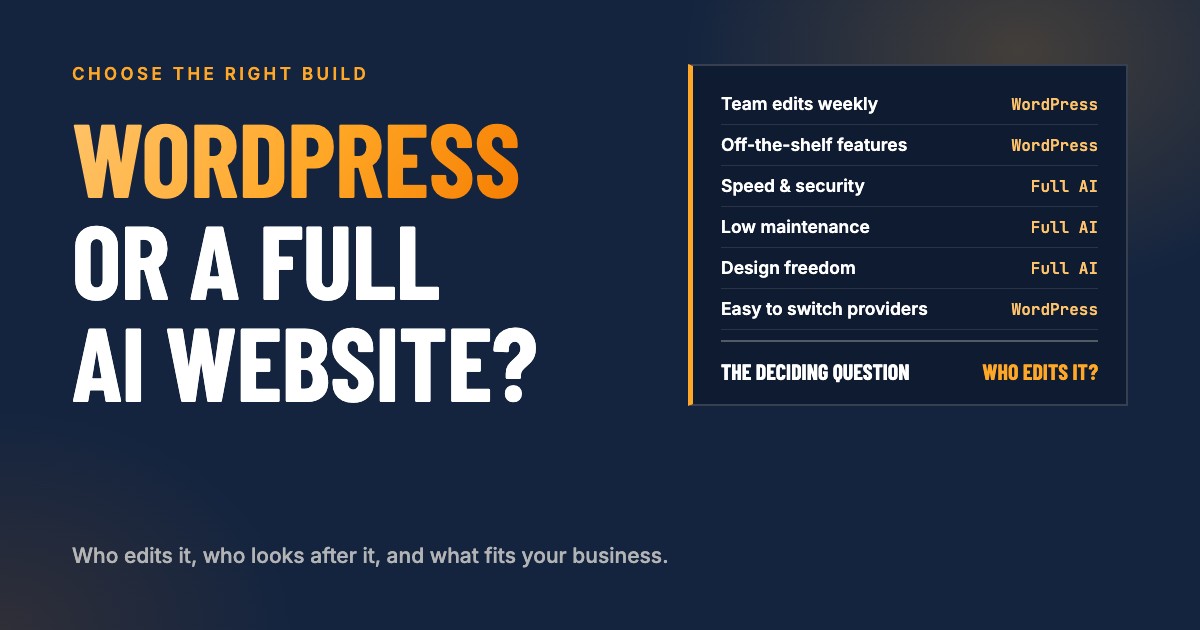
The short answer: choose WordPress (with a page builder and AI to help) when several people on your team need to edit the site themselves, when you want any web designer to be able to take it over, or when you need off-the-shelf features through plugins. Choose a full AI website (code written with an AI assistant such as Claude, stored on GitHub, hosted on Vercel) when speed, security, design freedom and low maintenance matter most, and one person or partner, in-house or external, builds and maintains it for you. The deciding question is rarely the technology. It is who edits the site, and who looks after it.
A website decision used to be simple: almost everyone built on WordPress. That has changed. AI coding assistants can now write, test and publish a complete, fast, custom website, which gives owner-led businesses a real second option. Both work. They just fit different businesses.
This guide starts with what everyone needs to know to decide, then goes deeper into the details that only matter in some cases: plugins, security, hosting, version control, search, integrations and costs. If you only read the first few sections, you will still know which direction fits you.
A note on where we stand: we build websites both ways, on WordPress with AI and fully with AI, and choose with each client. We have no reason to push one, which is why this guide is direct about the downsides of both.
What is the difference, in plain terms?
WordPress with a page builder and AI is the familiar setup. WordPress is the content management system, a page builder (or WordPress’s own block editor) lets you design pages visually, plugins add features such as forms, SEO and caching, and AI helps write copy, suggest layouts or generate small pieces of code. You log in to a dashboard to make changes.
A full AI website has no dashboard. The site is real code, written by an AI coding assistant such as Claude under the direction of the person building it. The code lives in a repository on GitHub, which keeps every version, and is published on a hosting platform such as Vercel, usually as a static site that loads from servers around the world. To change something, you describe the change, the AI makes it, the builder reviews it, and the new version goes live.
| WordPress + page builder + AI | Full AI (for example Claude + GitHub + Vercel) | |
|---|---|---|
| How you edit | Log in and edit visually | Describe the change; the builder reviews and publishes it |
| Who can edit | Anyone with a login and basic training | Mostly the builder, in-house or external |
| Features | Plugins, off the shelf | Built into the code as needed |
| Maintenance | Regular updates of WordPress, theme and plugins | Few moving parts; changes when you want them |
| Speed | Depends on theme, plugins and hosting | Usually very fast by default |
| Security | Main risk is plugins | Very small attack surface for a static site |
| Version history | Backups, depending on the host | Every change saved on GitHub, easy to roll back |
| Design freedom | Within the builder’s possibilities | Anything that can be built on the web |
| Support | Thousands of freelancers and agencies | The builder, or a developer comfortable with code and AI |
| Switching providers | Easy | Possible, but needs someone who works with code |
Which one is right for you?
WordPress is usually the better fit if:
- Several people on your team edit pages, posts or products every week without help.
- You want to be able to hand the site to any web designer or agency later.
- You need a feature that a mature plugin already does well, such as a membership area, bookings or a store, and you do not want it built.
- Someone in your business already knows WordPress well.
- Your budget favors doing small changes yourself over paying for each one.
A full AI website is usually the better fit if:
- You want a fast, secure site with as little maintenance as possible.
- One person or partner, in-house or external, takes care of the site, and you are comfortable with that.
- You want a design and structure that does exactly what your business needs, without fighting a builder.
- Search, AI search and speed matter to how you win work.
- You prefer clear changes on request over logging in and editing yourself.
Either works well if you mainly need a clear, credible marketing site with a handful of pages, a contact form, a booking calendar and a blog, and someone looks after it properly.
What should you check before you decide?
Answer these for your own business:
- Who will edit the site, and how often? One person monthly points toward full AI; several people weekly points toward WordPress.
- Do you want to edit it yourself, or have it done for you? Do it yourself favors WordPress; done for you works with either and suits full AI best.
- Do you want one partner to look after the site, or several people to work on it? One partner suits full AI; several people suits WordPress.
- Which features do you need? List them, then check whether a reliable plugin exists or whether it should be built.
- How much maintenance will you actually do? If the honest answer is “none”, a WordPress site will age badly; full AI asks for less.
- How important are speed and search visibility? The more they matter, the stronger the case for full AI.
- What tools must the site connect to? CRM, booking, payments, email: check both routes.
- Who supports you if your builder disappears? Make sure either option has a plan B.
- What is your monthly budget for the site, including updates, plugin licenses, hosting and changes, not only the launch?
- Do you have compliance or accessibility requirements that need specific features or documentation?
What are the pros and cons of WordPress with a page builder and AI?
Pros
- Familiar. WordPress runs around 40 percent of all websites, according to W3Techs. Most web professionals, and many marketing assistants, know their way around it.
- Easy to share. You can give different people different roles, from editing blog posts to managing the whole site.
- Off-the-shelf features. The plugin directory lists tens of thousands of free plugins, with paid ones on top. Forms, SEO, translations, bookings, memberships and stores are a plugin away.
- Easy to switch providers. If your web designer leaves, another one can usually pick up the site quickly.
- AI helps here too. AI writes and improves copy, suggests layouts and generates small code snippets inside the familiar setup.
Cons
- Maintenance never stops. WordPress, the theme, the page builder and every plugin release updates, and each update can break something. Someone has to update, test and fix regularly.
- Plugins are the main security risk. Patchstack recorded 11,334 new vulnerabilities in the WordPress ecosystem in 2025; 91 percent were in plugins and only six in WordPress core.
- Speed suffers easily. Page builders and plugins add weight. In 2025 Chrome user data, WordPress came last among the major platforms for Core Web Vitals, with fewer than half of its sites passing. A well-built WordPress site can be fast; the average one is not.
- Design limits. You work within what the builder can do. Unusual layouts or interactions often mean custom code anyway.
- Plugin sprawl. Over time, sites collect plugins nobody remembers installing, with overlapping features and renewal fees.
What are the pros and cons of a full AI website?
Pros
- Fast by default. A static site served from a global network loads quickly without caching plugins or tuning.
- Secure by design. No login page, no database and no plugins on the public site means very little to attack.
- Low maintenance. There are no weekly plugin updates. The site changes when you decide it should.
- Every change is saved. GitHub keeps the full history: what changed, when and why, and any version can be restored in minutes.
- Design and structure without limits. The site does exactly what your business needs, from page layouts to multilingual versions to custom features.
- Search and AI search built in. Structured data, clean code, fast pages, translations and files for AI assistants can be part of the site itself, not bolted on.
- Quick, consistent changes. Describe a change once and it can be applied across every page, consistently, with checks before it goes live.
Cons
- Changes go through your builder. Most changes are made by the person or partner who builds and maintains the site, so a reliable, responsive partner matters.
- No familiar dashboard. Your team cannot simply log in and edit a page the way they would in WordPress, unless an editing interface is added.
- A smaller pool of support. Fewer people work this way today, though the code itself is standard and any capable developer can read it.
- Features are built, not installed. Something a plugin would add in minutes may need to be built, tested and looked after.
- It needs judgment. AI writes the code, but someone has to decide what to build, review the result and keep the quality high.
Who edits the site, and who looks after it?
This is the question that decides most cases.
Team access
WordPress was built for shared editing. You can give a marketing assistant access to blog posts, a manager access to pages, and an agency full control, each with their own login and role. Many people already know how to navigate its core parts: pages, posts, media and menus.
A full AI website has no shared dashboard by default. Content can live in simple text files that a careful person can edit, or the site can be connected to an editing interface for specific content such as blog posts. But for most businesses, changes run through the builder. That works well when changes are occasional and someone is responsible for them; it is frustrating when five people want to edit the site every week.
Do it yourself or done for you
If you want to make changes yourself, WordPress is the friendlier choice: learn the editor and you can update text, swap images and publish posts.
If you prefer to describe what you want and have it done, both work, and full AI often works better: one request, made consistently across the site, reviewed and published, with nothing to break in a dashboard.
Dependency, in perspective
With full AI, the person or partner who builds the site usually also maintains it, whether that is an employee or an outside partner. That is a dependency, but a familiar one: most businesses on WordPress also rely on their web designer or agency for anything beyond small text edits, from plugin updates to layout fixes.
What matters in both cases is the same: a partner who is reliable and responds quickly, and work that stays understandable. A full AI website is standard web code with a complete history of every change, which keeps it clear and easy to follow over time.
WordPress has dependencies too, they are just spread out: your host, your theme, your page builder and every plugin author. When one of them stops updating, you inherit the problem.
Support
For WordPress, help is everywhere: freelancers, agencies, hosting support, forums and documentation for every plugin. For a full AI website, support comes from your builder, and beyond that from developers comfortable working with code and AI. The pool is smaller but growing quickly, and because the site is standard code with a full history, a new developer can understand it faster than an unfamiliar WordPress setup with forty plugins.
Should features come from plugins or be built for you?
On WordPress, features come as plugins. That is fast and affordable, but each plugin is code written by someone else, updated on their schedule, with its own settings, renewals and risks. Good practice is to use few plugins, choose well-maintained ones, and remove anything unused.
On a full AI website, features are built into the site. Simple things, such as a contact form connected to your CRM, a booking calendar, a cookie notice or a blog, are quick to build and stay under your control. Complex things, such as a full store or a membership area with logins and payments, are better handled by a specialist platform connected to the site than built from scratch.
A useful rule: if a feature is standard and a trusted tool already does it well, connect or install it. If it is specific to how your business works, building it is often cleaner than bending a plugin.
How secure is each option?
WordPress: keep WordPress, the theme and plugins updated, ideally weekly; remove unused plugins; use strong logins with two-factor authentication; keep daily backups off the server; and use a host with a firewall and malware scanning. Every skipped update leaves known vulnerabilities open.
Full AI: a static site has no database or admin login exposed to the internet, which removes the most common attack paths. The remaining care is in the accounts: two-factor authentication on GitHub, the hosting platform and the domain registrar, and careful handling of any keys used by forms or integrations, which should never sit in the public code.
How do hosting, uptime and monitoring compare?
WordPress runs on a server that has to be kept healthy. Managed WordPress hosting takes care of most of it: updates, backups, caching and security. Cheap shared hosting often becomes the weak point for speed and uptime.
A full AI website on a platform such as Vercel is served from a global network, so there is no single server to look after. Business sites run on a paid plan, and the strongest uptime guarantees usually come with the higher tiers.
For both, set up simple uptime monitoring that alerts you when the site or a key form stops working, and check Google Search Console monthly for errors.
Can you undo a change that went wrong?
Version control means every change is recorded and any earlier version can be restored.
On a full AI website, this is built in: GitHub records every change with a description, so you can see exactly what changed and undo it in minutes. Preview links let you check a change before it goes live.
On WordPress, rollback depends on backups and page revisions. Revisions cover the content of posts and pages; for everything else, such as plugin updates, settings or design changes, you restore a backup, which may also undo other recent work. A staging site, a copy for testing updates, helps a lot and is offered by most managed hosts.
Which one is faster?
Speed affects how many visitors stay, and Google uses Core Web Vitals as one of its page experience signals.
A full AI website, built as a static site, is typically fast without effort. A WordPress site can be fast, but it takes discipline: a lightweight theme or builder, few plugins, image optimization, caching and good hosting. The average WordPress site does not get there, which is why WordPress came last among major platforms in the 2025 Core Web Vitals comparisons.
Which one does better in Google and AI search?
SEO gets you found on Google; AEO and GEO (answer and generative engine optimization) get you cited by AI tools such as ChatGPT, Perplexity and Google’s AI Overviews. Both options can do all three well. The difference is how.
What matters for both:
- Clear pages that answer the questions your customers ask, with the answer near the top.
- A clean structure with one main topic per page and descriptive headings.
- Structured data that tells search engines what your business, services and articles are.
- Fast pages that work well on a phone.
- Consistent business details across your website, Google Business Profile and other listings.
- Helpful, original content. Google has said it rewards quality content however it is produced, AI-assisted included, as long as it is made to help people, not to manipulate rankings.
On WordPress, most of this comes from an SEO plugin for titles, descriptions, sitemaps and basic structured data, plus your own content work. More advanced structured data or AI search files often need extra plugins or custom code.
On a full AI website, it is built into the code: titles and descriptions for every page, structured data for the business, services, articles and FAQs, multilingual versions linked correctly, a file that summarizes the site for AI assistants, and checks that flag missing details before anything goes live.
How do analytics and tracking work on each?
Both options use the same tools: Google Analytics, Google Search Console and, if you use one, a tag manager. On WordPress they are usually added through a plugin; on a full AI website they are added once in the site’s code and apply to every page. What matters more than the platform is planning what you measure: leads, calls and bookings by source. Our guide to UTM parameters covers how to track where every lead comes from.
Who writes and edits the copy?
AI helps write and improve copy in both setups, and in both, the content is only as good as the thinking behind it: who the page is for, what it should get them to do, and proof that you can deliver. Have a person review every page for accuracy and tone; AI drafts, people decide.
The practical difference is the editing workflow. On WordPress, your team edits copy directly. On a full AI website, copy changes go through the builder, which keeps the site consistent but takes the edit out of your own hands.
How does each connect to your CRM and other tools?
Most websites need to connect to a CRM, booking calendar, payments, email marketing, chat or reviews.
- Standard integrations, such as embedding a form or booking calendar from your CRM, work the same way on both: you paste an embed code. Many tools also offer WordPress plugins.
- Custom integrations, such as sending form data to two systems, showing live data from another tool or an unusual workflow, are often easier on a full AI website, where the integration is written for exactly what you need. On WordPress they mean either a plugin that almost fits or custom code inside WordPress.
Why do strategy and design come first, either way?
The platform does not make a website work. The plan does: who the site is for, what it must get them to do, what proof they need, and how every page leads to one clear next step. Decide that first, then pick the platform that delivers it with the least friction for your team.
On design: WordPress builders make good-looking sites quickly within their patterns. A full AI website can follow any design, which is an advantage when you want something distinctive or a structure built around how your customers decide.
What do these websites look like in practice?
A few examples from our own work: our own site, and one client site of each kind.
Full AI: this website
impetuconsulting.com is built fully with AI: written with Claude, stored on GitHub and hosted on Vercel. It runs in English, Spanish and German, with structured data on every page, a summary file for AI assistants, and automatic checks that catch missing details before a change goes live. Changes like a new page, a new blog post in three languages or a site-wide update are described, reviewed and published, often the same day.
Full AI: Sano Select
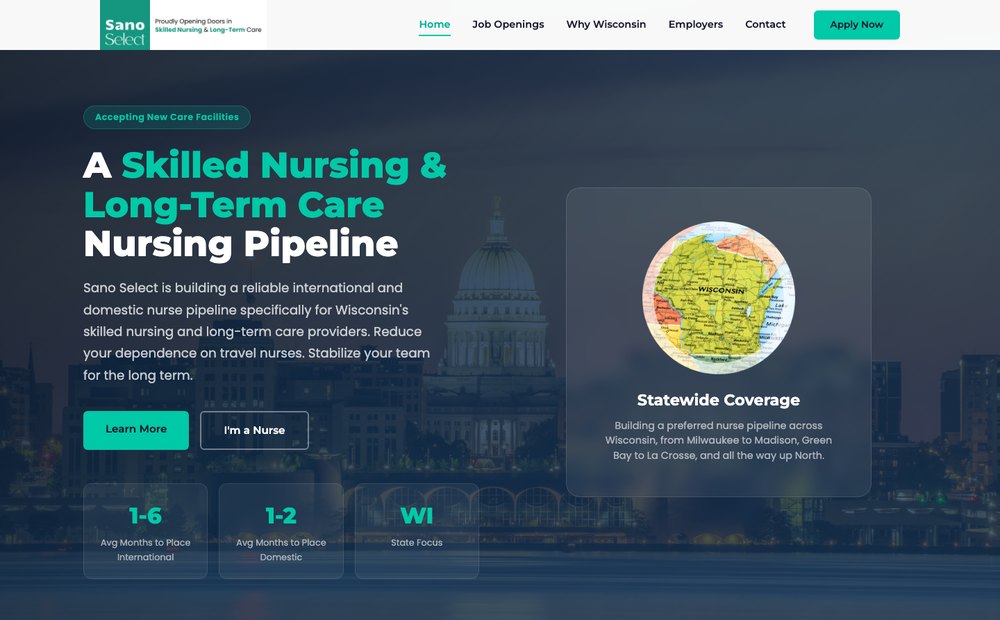
A nursing recruitment site with one path for facilities hiring and one for nurses. A custom hero with the state map, key numbers up front and a button for each audience, none of it from a template. See the project.
WordPress with AI: I Fix Hearts
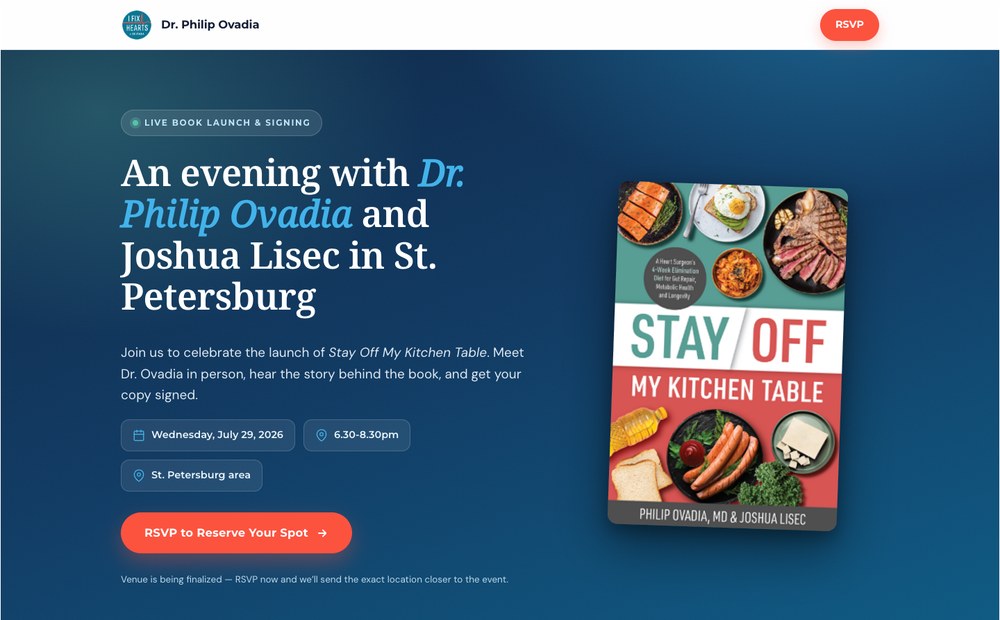
Dr. Philip Ovadia’s heart health pages, here for a live book launch and signing. The pages run inside WordPress’s page builder, but were built with full AI rather than the builder’s own design features: a bold event hero, the book up front, and the RSVP handled right on the page. See the project.
All of these approaches can produce an appealing, strong website that brings in work. The right one depends on who edits and looks after it, not on which can look better.
How much does each option cost over time?
The launch is the smaller part of the cost; looking after the site month after month is the bigger one. Neither option is free to run: even when your own team maintains WordPress, their time costs money, though it can be cheaper than paying someone outside.
| Cost | WordPress + builder + AI | Full AI |
|---|---|---|
| Hosting | Managed WordPress hosting, monthly or yearly | A hosting platform such as Vercel, usually a modest monthly fee plus usage |
| Software | Page builder and premium plugin licenses, usually yearly | Usually none beyond hosting and the AI tools your builder uses |
| Maintenance | Regular updates, testing and fixes, by your team or a provider | Little routine maintenance |
| Changes | Your team’s time, or paid to a provider per request or in a plan | Done by the builder, per request or in a plan |
| With an external provider | A monthly maintenance plan, or pay per request | A monthly plan that usually includes hosting, uptime monitoring, updates and an agreed amount of changes |
| Your team’s time | Learning, editing and maintaining | Describing changes and reviewing them |
Whichever you choose, ask your provider what a monthly maintenance plan includes, what it costs, and what a change outside the plan costs, so you can compare like with like.
Can you switch later?
Yes, in both directions, but with limits and real effort. How much depends on the setup: how many plugins the site relies on or how much is custom built, how large the site is, and how many forms, integrations and languages it has.
That is why it pays to make the right decision for your business now, instead of planning to switch later. If you do change, going from WordPress to full AI is usually the easier direction, although it depends on many factors. And once a site is on full AI, most businesses want to stay there.
If you are unsure which way to go, book a call and we will talk through the pros and cons for your business.
Questions to ask before you choose
- Who will edit the site, and what exactly will they change?
- Who maintains it after launch, and what happens if they are unavailable?
- How quickly are changes made?
- What does the monthly maintenance plan include, and what does a change outside it cost?
- How are updates, backups and security handled, and how often?
- How do we measure leads from the site?
- What happens to SEO if we ever move platforms?
If you want help deciding which fits your business, book a call and we will look at it with you. More about the websites we build.
Sources
- W3Techs: Usage statistics of content management systems (WordPress share of all websites)
- Patchstack: State of WordPress Security in 2026 (vulnerabilities in 2025, share in plugins and core)
- Search Engine Journal: 2025 Core Web Vitals CMS rankings (share of sites passing Core Web Vitals by platform)
- Google Search Central: Google Search’s guidance about AI-generated content
- WordPress.org: Plugin directory
FAQ
Frequently asked questions
Is a website built with AI better than WordPress?
Neither is better for everyone. A full AI website is usually faster, more secure and more flexible, and has no plugins to update, but every change goes through the person or partner who builds it. WordPress is slower and needs more maintenance, but almost anyone can learn to edit it and thousands of people can support it. The right choice depends on who edits the site and who maintains it.
What is a full AI website?
A website whose code is written and maintained with an AI coding assistant such as Claude, stored in a version-controlled repository on GitHub, and published on a hosting platform such as Vercel. There is no WordPress dashboard; changes are made by describing them to the AI, reviewing the result and publishing it.
Can my team edit a website built with AI?
Not the way they would edit WordPress. Content can be kept in simple text files or connected to an editing interface, but most changes go through the person who builds and maintains the site, in-house or external. If several people need to edit pages every week without help, WordPress is usually the better fit.
Is WordPress still a good choice in 2026?
Yes, for many businesses. WordPress runs around 40 percent of all websites, almost every web professional knows it, and its plugins cover nearly any feature off the shelf. It suits teams that edit the site themselves and businesses that want to switch providers easily. Its weak points are plugin maintenance, security updates and speed.
Are WordPress websites less secure?
WordPress core is well maintained; the risk sits mostly in plugins. In 2025, 91 percent of the 11,334 new WordPress vulnerabilities Patchstack recorded were in plugins and only six in WordPress core. A WordPress site with few, well-chosen plugins, updated promptly, is secure. A static site built with AI has far fewer moving parts to attack.
Do AI-built websites rank in Google and AI search?
Yes. Google rewards helpful, original content regardless of how it is produced. What matters for SEO, AEO and GEO is clear content, fast pages, structured data and a sound site structure. A full AI website can build all of that into the code; WordPress gets most of it through SEO plugins.
What does hosting a full AI website cost?
Hosting platforms such as Vercel offer free plans for personal projects; a business website runs on a paid plan, usually a modest monthly fee plus usage. The bigger cost is the time of whoever builds and maintains the site, just as it is with WordPress.
Can I move from WordPress to an AI-built website later, or back?
Yes, in both directions, but with limits and real effort, depending on the plugins or custom features, the size of the site, and its forms and integrations. Going from WordPress to full AI is usually the easier direction. It pays to make the right decision for your business now instead of planning to switch later.

Written by
Konstantin von BrockeFounder of Ímpetu Consulting. Konstantin runs marketing, websites and CRM systems for owner-led businesses, and builds the tracking that shows which of it pays off.