HighLevel / CRM / Strategy
Is HighLevel the Right CRM for Your Business?
Whether HighLevel is the right CRM for your business: who it fits, when another CRM fits better, why it is usually the right choice for small businesses, its real limitations, when to connect specialized tools, and what larger companies need that HighLevel is not built for.
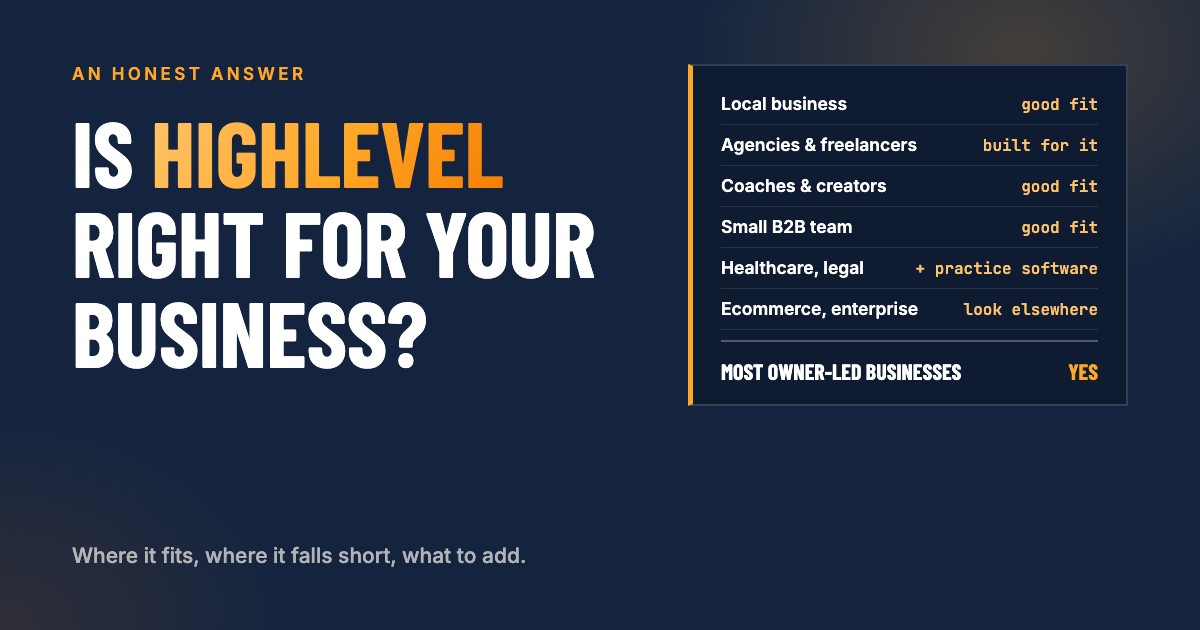
The short answer: for most small businesses, HighLevel could be the right CRM. It brings a full CRM, calendars, email and text marketing, native integrations with Meta and Google, built-in AI and memberships, AI agents and much more into one account, usually for less than the separate tools it replaces. Businesses in industries with their own software, such as healthcare, legal or field service, can still use HighLevel as their CRM for marketing and sales; they also need their practice or operations management software alongside it. Mid-size to large companies that need complex data models, forecasting, territories and heavy customization usually need an enterprise CRM instead.
Choosing a CRM is one of the few software decisions that shapes how a business runs day to day. Leads arrive there, follow-ups happen or get forgotten there, and the numbers you make decisions on come from there. Pick one that is too small and you outgrow it in a year. Pick one that is too big and you pay for features nobody uses, while the team quietly goes back to spreadsheets.
This guide starts with what matters to almost every business, then works toward the questions that only matter to some: specialized industries, connecting other tools, and finally what larger companies need. If you run a small or owner-led business, the first half will likely answer your question.
A note on where we stand: we set up and run HighLevel for clients, so we have an interest in it. That is also why this guide is direct about where it falls short. Recommending it to a business it does not fit costs everyone more than it earns.
What is HighLevel, in plain terms?
HighLevel is an all-in-one CRM and marketing platform. A CRM (customer relationship management system) is where a business keeps track of everyone it deals with: every lead, customer, conversation, appointment and deal. HighLevel adds the tools that bring those people in and keep them moving: websites and landing pages, forms, booking calendars, email and text marketing, automated follow-up, review requests, invoices and payments, and AI assistants.
It is sold mainly through agencies and consultants. HighLevel’s own plans ($97, $297 and $497 a month) are agency plans; each business gets its own workspace, called a sub-account, under an agency account. If you buy HighLevel from a marketing agency or consultant, that is what you get, and the agency sets your price and provides your support. What it really costs, fee by fee, is covered in What does HighLevel really cost?
Who is HighLevel a good fit for?
Agencies and freelancers
HighLevel was built for them. An agency or freelancer gets one account with a separate sub-account for every client, can brand the platform as its own, copy proven setups from one client to the next as templates, and resell the software as part of its service. For marketing agencies, web designers and automation specialists, it often replaces a whole stack of tools they would otherwise manage per client.
Local businesses
Businesses that serve customers in their area and live on calls, bookings and reviews:
- Home services and contractors: roofers, HVAC, plumbers, electricians, landscapers, cleaning companies, remodelers
- Health and wellness: dentists, chiropractors, physical therapists, med spas, gyms and studios
- Professional services: accountants, insurance agents, real estate agents, law firms
- Personal and auto services: salons, barbers, auto repair and detailing, pet care
Coaches, consultants, course creators and influencers
People who sell their expertise: they need funnels and landing pages, booking, payments, email and text follow-up, and often online courses, memberships and communities. HighLevel has all of those built in, so the audience, the sales process and the delivery live in one place.
Small B2B sales teams without complex structures
A handful of salespeople working one or a few pipelines, with straightforward deals: a consulting firm, a software reseller, a training provider, a B2B service company. HighLevel covers the pipeline, the follow-up sequences, the meetings and the reporting such a team needs. It becomes a stretch once a sales organization needs territories, forecasting and layers of management (see the section on larger companies below).
When is a different CRM the better choice?
HighLevel is a strong default, not a universal answer. Look elsewhere when:
- You run a traditional ecommerce store. Large catalogs, product variants, inventory and purchase-based emails drive revenue in ecommerce, and an ecommerce platform is built for that. You can still connect your store to HighLevel and run your marketing and follow-up through it, but HighLevel is not made to be a large online storefront. Its own store works best for a few simple products, such as company apparel, or for businesses that sell only a handful of items without heavy customization.
- You are an enterprise company. Many business units, complex data, sales forecasting and territories, formal procurement and heavy customization call for an enterprise CRM. The details are in the section on larger companies below.
- You need deep, specialized operational customization. When the core of the business is a complex operation, such as dispatching crews with job costing, manufacturing, logistics or custom-built applications, that operation belongs in software built for it. HighLevel can still run marketing and sales next to it.
Why is HighLevel usually the right answer for small businesses?
It solves the problems most small businesses share
- Leads come in from several places: the website, Google, Facebook or Instagram, phone calls, referrals. HighLevel collects them in one place, with where each one came from.
- Speed and follow-up decide who wins the job: the business that answers first and follows up reliably gets the work. HighLevel answers and follows up automatically.
- Customers book time: consultations, estimates, appointments, sessions or calls. Calendars, reminders and rescheduling are built in.
- A small team handles sales and service: one shared inbox and pipeline keep everyone on the same page.
- Repeat business and reviews matter: review requests and win-back campaigns run on their own.
One system instead of seven
A typical small business pays separately for an email marketing tool, a scheduling tool, a form builder, a website builder, a texting service, a review tool and a CRM, and then pays again in time to copy information between them. HighLevel covers all of those in one account with one contact record. When a lead fills in a form, books a call, replies to a text and pays an invoice, it all lands on the same contact, in order.
Follow-up that happens without someone remembering
The biggest gain for most small businesses is not a feature, it is consistency. Workflows can answer every new lead within a minute, remind people of appointments, chase unpaid invoices, ask happy customers for a review and bring back people who went quiet. Those are the tasks that slip in a busy week, and each one is money.
Everything on your phone
The mobile app gives the team the inbox, contacts, pipeline and calendar wherever they are, which matters when the owner is on a job site or between appointments.
It grows with you
You can start with the basics (contacts, a pipeline, a form, a calendar and one automation) and add a website, marketing campaigns, payments, memberships or AI later, without moving to a new system. Custom objects are included in every plan, so even businesses with unusual data (properties, vehicles, policies, students) can model it.
The cost is usually lower than what it replaces
Usage charges for email and texting are small for most small businesses, often well under $50 a month at HighLevel’s prices. The real costs are the subscription your provider sets and the time to build and run it. Compared with paying for several separate tools, most small businesses come out ahead, provided the account is actually set up and used.
How do you know if HighLevel fits your business? Five questions
Answer these honestly before you commit to any CRM:
- Where do you lose money today? Slow replies to new leads, no-shows, forgotten follow-ups, no reviews, unpaid invoices? HighLevel is strong at all of these. If your losses are elsewhere (inventory, job costing, scheduling crews), look at the tools built for that first.
- What does your business already run on? If an industry system runs your operations and your team likes it, HighLevel should connect to it, not replace it.
- Who will set it up and look after it? A CRM that is half set up is worse than a spreadsheet. Decide now whether you build it yourself, have it built, or have it run for you.
- How many people use it, and for what? A team of one to twenty with shared sales and service fits well. Fifty salespeople with territories and quotas is a different conversation.
- Do you have compliance requirements? Healthcare, finance and legal businesses need to check data handling before anything else. HIPAA compliance, for example, is available as a paid add-on (more on that below).
If your answers point to lead handling, follow-up, booking and reviews, a small team, and no heavy compliance or industry system, HighLevel is very likely the right choice.
What are HighLevel’s limitations for small businesses?
These are the limits that matter to small businesses, not only to large ones.
It does many things well, not everything best
The core of HighLevel (CRM, pipelines, shared inbox, email and text marketing, calendars, forms and automations) is strong, and its more specialized areas, such as AI agents, memberships, courses and communities, easily meet the needs of most businesses too. Only when one of those areas becomes the center of the business, for example custom AI built deep into your operations, a large course business, complex customer support or dispatching crews with job costing, does a tool built for that one job go further. For most small businesses, strong in one place beats excellent in seven places that do not talk to each other.
Setup takes real time
HighLevel can do almost anything, which means it does nothing until someone sets it up. Business profile, compliance settings, users, custom fields, tags, forms, calendars, workflows, the email sending domain and testing all have to be done, in the right order. Expect several days of work spread over a few weeks for a careful setup, and a few hours a month to keep it running. Our step-by-step setup guide shows what that involves.
Your experience depends on your provider
Because most businesses get HighLevel through an agency, that agency decides your price, which features you see, how usage is billed and how good your support is. Two businesses on the same software can have very different experiences. Ask who supports you, how fast, and what is included before you sign.
Reporting is practical, not deep
The dashboards answer the questions most small businesses ask: how many leads, from where, how many booked, how many won, how much revenue. Questions that need data from several systems, or complex analysis across years, are better answered in a separate reporting tool fed from HighLevel. Attribution is only as good as the tracking behind it; our guide to UTM parameters in HighLevel covers how to get it right.
The interface changes often
HighLevel ships new features at a fast pace. That is good for capability and harder for teams who just learned where everything is. Plan for short refreshers, and keep your own written processes so a moved button does not stop the work.
Texting and email need setup to work well
In the United States, business texting requires a one-time registration (A2P 10DLC) before messages go out reliably, and email needs a properly set up sending domain to stay out of spam folders. Neither is hard, but skipping either one is the most common reason a new account seems not to work.
Permissions are simpler than in enterprise systems
Each user is an Admin or a User, refined with granular permissions and settings like only seeing their assigned contacts. That covers most small teams well. It is less suited to deep hierarchies where many managers need different views of different teams’ data.
Regulated industries need extra steps
HighLevel is not HIPAA compliant by default. Its optional HIPAA add-on costs $297 a month at the agency level, includes a signed Business Associate Agreement, encryption of protected health information, audit logging and enforced multi-factor authentication, and cannot be turned off once purchased. Healthcare practices should confirm their provider has it before storing any patient information. Other regulated industries should check their own requirements the same way.
When should you connect HighLevel to specialized tools?
Most businesses that choose HighLevel still keep one or two specialized tools. The usual rule: HighLevel is the hub for customers, conversations and marketing; specialized tools run the operations they were built for.
| Need | Keep or add | How it connects |
|---|---|---|
| Accounting and bookkeeping | Accounting software such as QuickBooks | Native QuickBooks integration for invoices and contacts |
| Job scheduling, dispatch, job costing | Field service software | Integration, Zapier or webhooks: new jobs and customers sync both ways |
| Online store, inventory | Ecommerce platform | Integration or Zapier: buyers and orders flow into HighLevel for follow-up |
| Complex customer support | Help desk software | Tickets stay in the help desk; customer status and tags sync |
| Contracts with complex approval steps | Document and e-signature tools | Signed status and documents back on the contact |
| Reporting across systems | A reporting or BI tool | Data exported or pulled from HighLevel and the other systems |
| Clinical or legal records | Industry practice management systems | Only contact and marketing data in HighLevel, records stay in the specialist system |
On accounting, know the details before you rely on the sync. In HighLevel’s QuickBooks integration, invoices created in HighLevel sync to QuickBooks once they are sent, pending or paid, not while they are drafts, and only invoices created after you connect. Contacts sync from QuickBooks into HighLevel, and customers need to match in both systems. That works well when it is planned and causes duplicates when it is not.
How to connect tools without creating a mess
- One home per type of data. Decide which system owns contacts, which owns invoices, which owns jobs. Every other system reads from the owner.
- Decide the direction of every sync. One way or both ways, and what wins when two systems disagree.
- Use native integrations first, then the HighLevel marketplace, then Zapier or webhooks, and the API only for what none of those can do.
- Map the fields on paper first. Names, phone formats, tags and statuses should mean the same thing in both systems.
- Test with real examples before you switch it on for everyone, and check the first week of syncs by hand.
How should you decide?
| Your situation | Likely answer |
|---|---|
| Small or owner-led business, leads from several channels, appointments, a small team | HighLevel, set up properly |
| Small business in an industry with its own software (healthcare, legal, field service) | HighLevel for marketing and sales, alongside the practice or operations software |
| Traditional ecommerce store | An ecommerce platform, optionally connected to HighLevel for marketing and follow-up |
| A few simple products, such as company apparel | HighLevel’s own store |
| Small B2B sales team with simple pipelines | HighLevel |
| B2B sales organization with territories, forecasting and management layers | An enterprise or sales-focused CRM |
| Healthcare practice | HighLevel for marketing and sales with the HIPAA add-on and a signed BAA, alongside your practice management system |
| Mid-size or large company with complex processes | An enterprise CRM, possibly with HighLevel for specific marketing use cases |
What do mid-size and large companies need that HighLevel is not built for?
For most readers this section will not apply, but it explains where the line is.
As companies grow past a few dozen users, several business units or complex products, their CRM needs change:
- Complex data models. Large companies model accounts, divisions, contracts, assets, products and many relationships between them. HighLevel’s custom objects cover a lot, but they are capped at 10 objects per sub-account and 300,000 records per object, which an enterprise data model can exceed.
- Sales management at scale. Forecasting, territories, quotas, approval chains, and quoting for configurable products (often called CPQ) are core enterprise sales tools that HighLevel does not aim to provide.
- Deep permissions and structure. Role hierarchies across regions and teams, field-level security and detailed audit requirements go beyond HighLevel’s admin and user roles with granular permissions.
- Integration at enterprise volume. HighLevel’s public API allows 100 requests per 10 seconds and 200,000 per day for each app and account. That is plenty for a small business and a real constraint for a company syncing large data volumes with an ERP, a data warehouse and several internal systems.
- Heavy customization. Enterprises often build custom applications, page layouts and logic on top of their CRM, maintained by in-house administrators and developers. HighLevel is configured, not programmed, which is a strength for small businesses and a limit for large ones.
- Formal procurement and compliance. Security reviews, data residency requirements and contractual terms negotiated directly with the vendor are standard in large organizations and fit poorly with buying through an agency.
Platforms like Salesforce, Microsoft Dynamics 365 and HubSpot’s enterprise tiers are built for these needs, and they come with matching costs: higher license fees, implementation projects and usually a dedicated administrator. Some larger organizations still use HighLevel for one part of the business, such as a local marketing team, franchise locations or a specific product line, connected to the main CRM.
What should you ask before you commit to HighLevel?
- Who provides the account, what does it cost each month, and what is included?
- How is usage (email, texts, calls, AI) billed, and at what rates?
- Who sets it up, and what exactly is part of the setup?
- Who supports us after launch, how do we reach them, and how fast do they answer?
- Which of our current tools does it replace, and which will it connect to?
- If we leave, how do we export our contacts, conversations and data?
- Do we have compliance requirements, and are they covered in writing?
If the answers are clear and fit your business, HighLevel is very likely a good choice. If you want a second opinion on your situation, book a call and we can look at it with you.
Sources
- HighLevel: Custom Objects in all plans, with higher limits (10 objects per sub-account, 300,000 records per object, included in every plan since October 2025)
- HighLevel: Association limits in objects
- HighLevel: HIPAA compliance with HighLevel
- HighLevel: API rate limits
- HighLevel: Sub-account user roles, permissions and assigned data
- HighLevel: Setting up the QuickBooks integration
- HighLevel: HighLevel pricing guide
FAQ
Frequently asked questions
Is HighLevel good for small businesses?
For most small, owner-led businesses, yes. It puts contacts, a sales pipeline, a shared inbox for email, text and social messages, calendars, forms, websites, automations, reviews and payments in one account, usually for less than the separate tools it replaces. The main costs are the time to set it up well and, if you do not do it yourself, someone to do it for you.
What are the main limitations of HighLevel?
It does many things well rather than one thing best, so for specialized needs such as advanced AI, large course and community programs, complex support or field service operations, dedicated tools go deeper. It takes real setup time, reporting is simpler than in enterprise CRMs, the interface changes often, and most businesses get their account through an agency, so the quality of support depends on that agency. Healthcare businesses need HighLevel's paid HIPAA add-on.
When should I choose a different CRM than HighLevel?
In three cases: you run a traditional ecommerce store, you are an enterprise company with complex data, sales structures and customization needs, or the core of your business needs deep, specialized operational customization, such as dispatch and job costing, manufacturing or logistics. Businesses in healthcare, legal or field service can still use HighLevel for marketing and sales, alongside their practice or operations software.
Can HighLevel replace all my other software?
It can replace many marketing and communication tools: email marketing, texting, scheduling, forms, a website builder, review requests and simple invoicing. It does not replace accounting software, and it is usually not the best home for job scheduling and dispatch, inventory, or complex support ticketing. Most businesses keep one or two specialized tools and connect them to HighLevel.
Does HighLevel integrate with QuickBooks?
Yes, there is a native QuickBooks integration. Invoices created in HighLevel sync to QuickBooks once they are sent, pending or paid, not while they are drafts, and only invoices created after you connect. Contacts sync from QuickBooks to HighLevel, so check how your customer records match before you rely on it.
Is HighLevel suitable for large companies?
Usually not as the main CRM. Large companies often need complex data models, many business units, sales forecasting and territories, quoting and configuration, deep permission structures and enterprise-scale integrations. HighLevel limits custom objects to 10 per sub-account and its API to 100 requests per 10 seconds and 200,000 a day per app and account. Enterprise CRMs like Salesforce, Microsoft Dynamics or HubSpot's enterprise tiers are built for that.
Is HighLevel HIPAA compliant?
Not by default. HighLevel offers an optional HIPAA add-on for $297 a month at the agency level. It includes a signed Business Associate Agreement, encryption of protected health information, audit logging and enforced multi-factor authentication. Once purchased it cannot be turned off.

Written by
Konstantin von BrockeFounder of Ímpetu Consulting. Konstantin runs marketing, websites and CRM systems for owner-led businesses, and builds the tracking that shows which of it pays off.